











An ecommerce tech stack is the group of software solutions that runs your online store, including the ecommerce platform, onsite search and merchandising, payment processing, inventory management, and analytics tools. The right tech stack is the smallest one that covers what your ecommerce business actually needs, because every extra tool adds cost, page weight, and manual work.
Most brands do not have a tool shortage. They have a sprawl problem. Budgets are tighter, teams are smaller, and shoppers expect a fast customer experience on every device. We brought together a panel of industry experts, Christina Cardelio (Strategic Account Executive, Yottaa), James Roberts (VP of Strategy & Business Development, ROSWELL), and Arthur Root (Founder & CEO, Nostra), to discuss how leading brands are rebuilding their stacks in our recent webinar. Here is what belongs in a stack, what sprawl costs you, and how to fix yours.
What Is an Ecommerce Tech Stack?
An ecommerce tech stack is every piece of software that runs your ecommerce store, working together as one system. It covers the storefront a shopper sees, the tools that move orders through the back end, and the analytics tools that report what happened. Your technology stack is a set of revenue decisions, not a shopping list.
What Are the Core Layers of a Tech Stack?
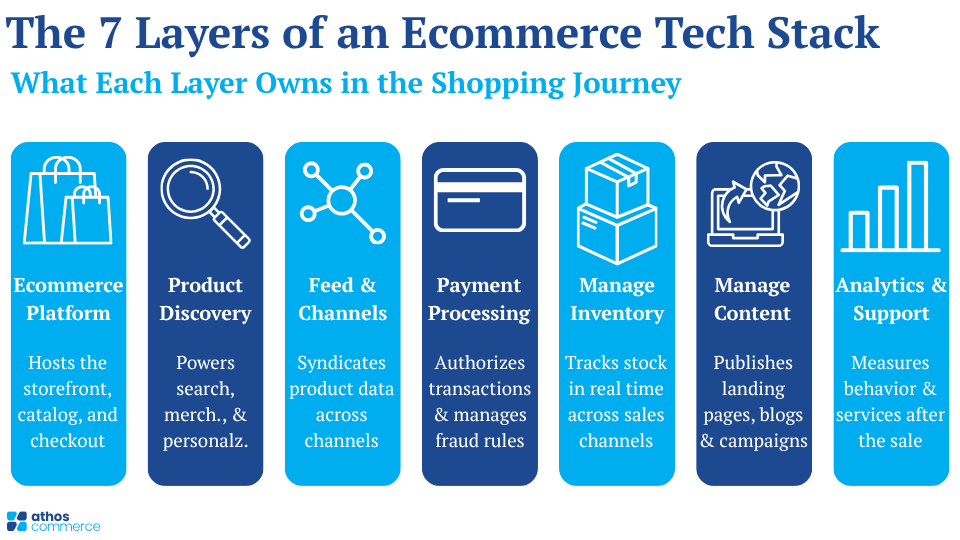
Most stacks contain seven layers. Each one owns a different part of the shopping journey.
| Layer | What it does |
| Ecommerce platform | Hosts the storefront, catalog, and checkout. |
| Product discovery | Powers onsite search, merchandising, and personalization. |
| Feed and channel management | Syndicates product data to marketplaces, social media, and AI platforms. |
| Payment processing | Authorizes transactions and manages fraud rules. |
| Inventory management | Tracks stock in real time across sales channels. |
| Content management system | Publishes landing pages, blogs, and campaign content. |
| Analytics and customer support | Measures behavior and handles customer service after the sale. |
Monolithic Platforms or Modular Architecture?
Monolithic platforms bundle most layers into one system from a single vendor. Setup is faster, and support is simpler. The tradeoff is that you use the features you are given.
Modular architecture, often called composable commerce, connects best-in-class tools through APIs. You get greater flexibility and can swap one tool without rebuilding the store. The tradeoff is more integration work. Most mid-market ecommerce brands land in the middle, running a stable ecommerce platform with a few specialist tools layered on top.
Why Does Tech Stack Sprawl Cost You Revenue?
Adding software is easy. Retiring it is not. Over a few years, that pattern leaves teams paying for overlapping tools that nobody fully uses.
How Much of Your Stack Are You Actually Using?
Less than you think. Gartner’s 2025 Marketing Technology Survey found that only 49% of martech tools are actively used, and just 15% of organizations qualify as high performers that hit their goals and show positive ROI. Half of what you pay for sits idle.
James Roberts
The cost is not only financial. Every tool you bolt onto the storefront loads scripts in the shopper’s browser.
Arthur Root
How Does Site Speed Affect Conversion?
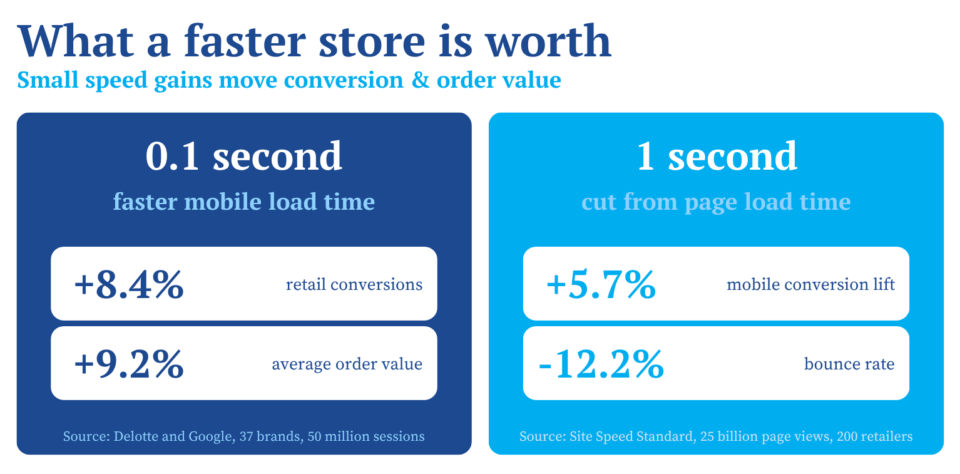
Directly and measurably. Deloitte and Google studied 37 brands across 30 million sessions and found that a 0.1 second improvement in mobile load time lifted retail conversions by 8.4% and average order value by 9.2%. Benchmark data from the Site Speed Standard, built on 25 billion page views across 200 retailers, shows that every second cut from load time delivers a 5.7% conversion lift on mobile and a 12.2% drop in bounce rate.
Christina Cardelio
How Do You Audit Your Ecommerce Tech Stack?
An audit takes a few days and usually pays for itself in the first round of cancellations. Work through it in order.
Five-Step Tech Stack Audit Checklist
- List every tool and its cost: Record the annual contract, owner, and renewal date for all software options.
- Score real usage: Mark each tool as heavily used, lightly used, or dormant based on logins and output, not on intent.
- Map overlap: Group tools by function and flag anywhere two or more products claim the same job.
- Measure page weight: Run a speed test and find which third-party scripts add the most load time to product pages and checkout.
- Check data flow: Note where product data, customer data, and order data live, and where teams move files by hand.
What Should You Consolidate First?
Start with the layers that touch the storefront, since those carry both a license cost and a speed cost. Product discovery is a common example. Many stores run one tool for search, another for recommendations, another for merchandising rules, and a separate feed tool for sales channels. Each one loads its own scripts and keeps its own copy of the catalog.
Consolidating those functions into one platform reduces cost, removes duplicate product data, and cuts the number of requests the browser has to make. Favor tools with native integrations for your ecommerce platform. Custom middleware is a recurring bill in developer hours.
What Should You Measure After You Consolidate?
Optimization is a habit, not a project. Reviewing site health weekly instead of quarterly catches problems while they are still small.
Which Metrics Matter Most?
- Core Web Vitals: These three metrics grade user experience and should be tracked on mobile first.
- Conversion rate by device: A gap between desktop and mobile usually points to a script or user interface problem.
- Zero-result searches: These show where shopper language and your catalog do not match.
- Cart abandonment: Sudden movement here often traces back to a checkout or payment processing change.
- Third-party latency: Watch how long each vendor script takes to respond during peak hours.
How Do You Prepare for Peak Traffic?
Small inefficiencies compound when traffic spikes. Run load testing before events like Black Friday and Cyber Monday, review your caching and CDN settings, and write a contingency plan for third-party outages so shoppers can still browse and buy. Give marketing, engineering, and merchandising a shared set of goals tied to revenue, so operational efficiency and marketing campaigns pull in the same direction.
Athos Commerce: Your Partner in Ecommerce Tech Stack Optimization
A leaner stack wins twice. You spend less on software, and your online store gets faster for the shoppers you already paid to acquire. Audit what you own, cut what you do not use, and consolidate the tools that sit closest to the buying moment.
Athos Commerce helps mid-market online retailers do exactly that. Our AI-powered product discovery platform combines onsite search, personalization, merchandising, and product feed management in one system, which replaces several point tools with a single integration. Artificial intelligence reads shopper intent beyond keywords, and our feed management validates and distributes your catalog to more than 1,400 destinations across digital channels, including marketplaces, social media, and AI platforms like ChatGPT and Gemini. Your team runs it without developers.
Request a demo and see what a consolidated discovery layer does for your revenue.
Frequently Asked Questions
What is an ecommerce tech stack?
An ecommerce tech stack is the collection of software that runs an online store. It includes the ecommerce platform, product discovery, payment processing, inventory management, a content management system, marketing automation, and analytics tools. These tools share data so a shopper can find a product, buy it, and get support in one connected experience.
What is composable commerce?
Composable commerce is a modular architecture where a retailer connects separate best-in-class tools through APIs instead of buying one bundled system. It gives teams greater flexibility to replace a single tool without rebuilding the storefront. It also requires more integration work than monolithic platforms.
How many tools should an ecommerce business run?
There is no fixed number, and the best tech stack depends on your business model. Every tool in the stack should have a named owner, documented usage, and a metric it moves. Tools that fail those three tests are candidates for removal at renewal.
How often should you audit your tech stack?
Audit the full stack once a year, and review contracts 60 days before each renewal date. Check site speed and technical issues monthly, since new scripts get added between audits.
📺 Watch the Webinar On-Demand
Want to hear the full conversation with Christina, James, and Arthur?